Catalyst R18 Release Notes
Catalyst release 18 includes the enhancement(s) and/or resolved issue(s) listed below.
Please contact our Catalyst support team at CatalystSupport@drb.com with any questions.
View previous Catalyst release notes here.
Specifications
|
Specification |
Value |
|
Name |
R18 |
|
Release Type |
Full |
|
Version |
1.18 |
|
Availability |
072125 |
Enhancement(s)
Landing Pages
SMS message opt-in confirmation is improved
- Landing page visitors who opt in to SMS text marketing messages now receive the confirmation SMS text message faster than previous releases.
Miscellaneous
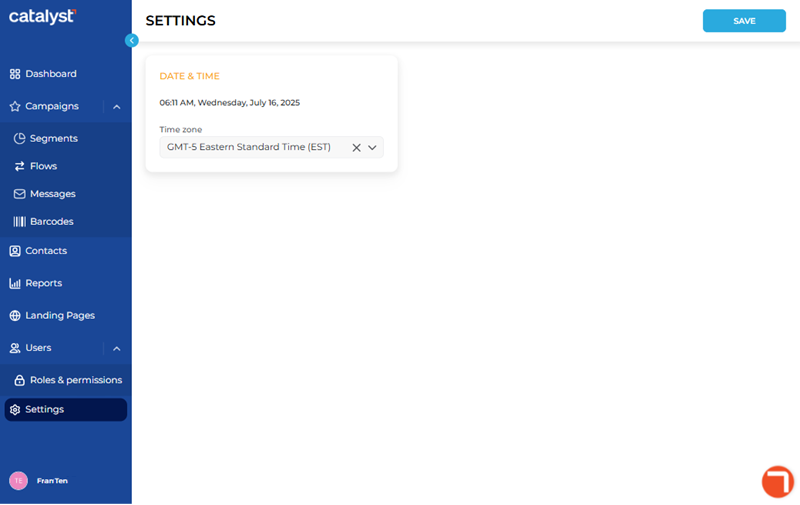
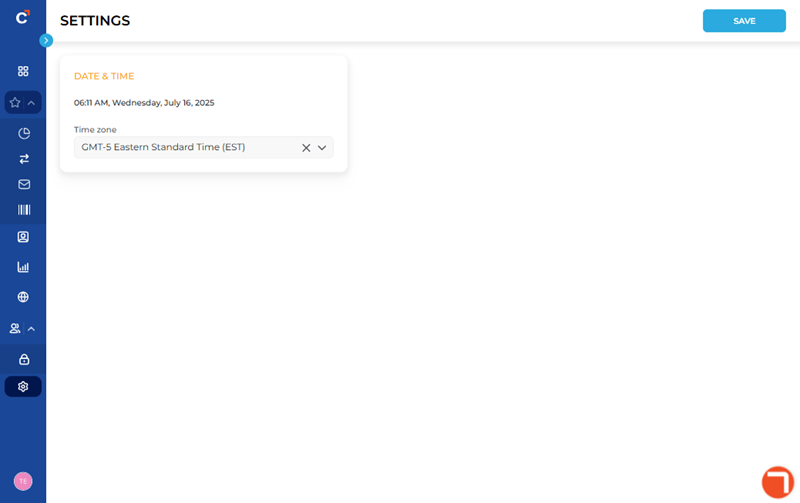
The Catalyst main menu can now by manually collapsed and expanded
- Catalyst users can now select a collapse/expand toggle function to minimize/maximize the Catalyst main menu (vertical menu on the left side). The menu is expanded by default.
Expand/Collapse Function
The expand/collapse function is located at the top left corner of the Catalyst application as a left/right arrow. The direction of the arrow changes based on the state of the menu.
|
Function State |
Description |
|
|
|
The menu is currently expanded. This is the default state. Select the function to collapse the menu. |
|
|
|
The menu is currently collapsed. Select the function to expand the menu. |
|


Expanded
Collapsed
|
Expanded |
Collapsed |
|
Dashboard |
|
|
Campaigns |
|
|
Segments |
|
|
Flows |
|
|
Messages |
|
|
Barcodes |
|
|
Contacts |
|
|
Reports |
|
|
Landing Pages |
|
|
Users |
|
|
Roles & permissions |
|
|
Settings |
|


Resolved Issue(s)
- General fixes.