Catalyst R21 Release Notes
Catalyst release 21 includes the enhancement(s) and/or resolved issue(s) listed below.
Please contact our Catalyst support team at CatalystSupport@drb.com with any questions.
View previous Catalyst release notes here.
Specifications
|
Specification |
Value |
|
Name |
R21 |
|
Release Type |
Full |
|
Version |
1.21 |
|
Availability |
101425 |
Enhancement(s)
Barcodes
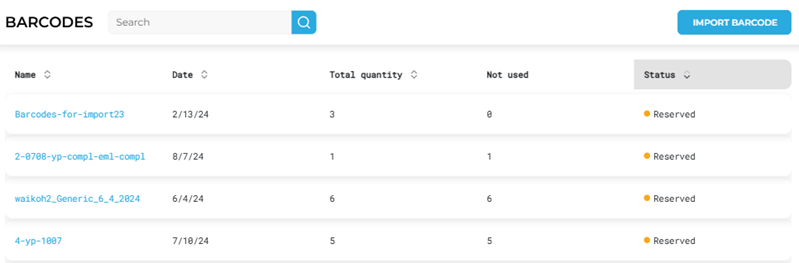
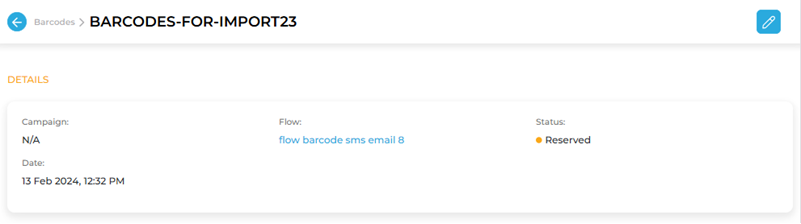
Catalyst users can now see if a barcode batch is reserved by a flow
- When users open the Barcodes panel, they can easily see if a batch is reserved by a flow. A Status column clearly identifies, via a Reserved status, a barcode batch that is assigned to a flow and therefore unavailable. Selecting a barcode batch name opens its settings, which includes the assigned Flow name, formatted as a link that can be used to open the flow.
Compliance
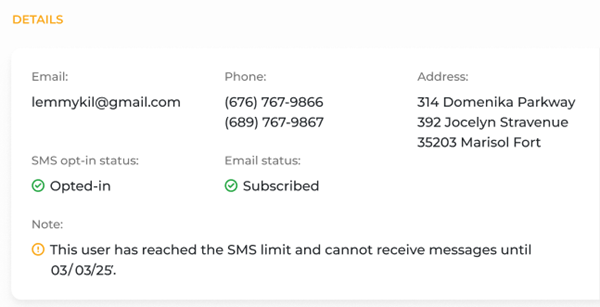
Catalyst users can now view recipients who aren't receiving messages due to data caps
- The Details section of the Customer Profile panel now provides a clear note indicating if the recipient is restricted from receiving messages due to a limit on the number of SMS messages they can receive, for example:
"This user has reached the SMS limit and cannot receive messages until MM/DD/YY". This feature also applies to email communications, showing similar limits when relevant. Additionally, usernames listed in the audience section are now clickable, allowing you to easily navigate directly to that user’s contact page for quick access to these details.
Miscellaneous
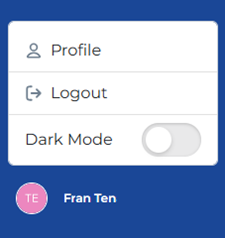
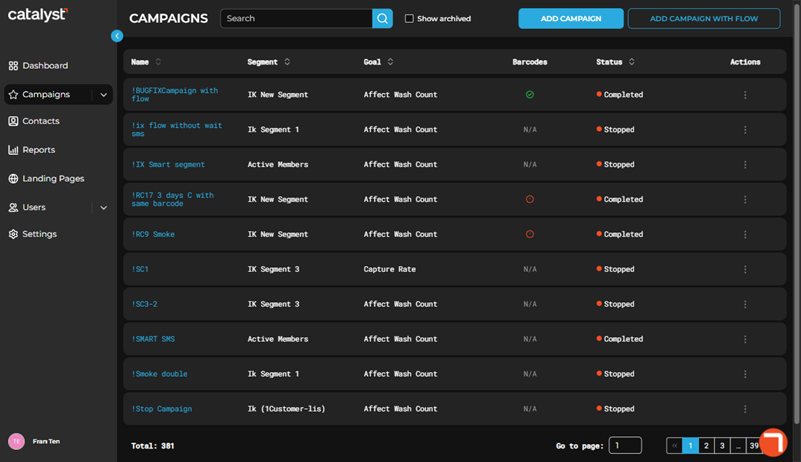
The Catalyst application now includes a Dark Mode option
- Catalyst users can now easily switch between light and dark modes using a Dark Mode toggle. The user's preference is saved automatically, so it stays the same even if they log out and log back in, or open a new tab. To access the Dark Mode setting, select the user's icon at the bottom left corner of the Catalyst application. Note that dark mode does not apply to the background of the Dashboard panel.
Resolved Issue(s)
- General fixes.