SEGMENTS
The Segments panel, accessible from the Catalyst main menu, lists all customer segments configured in Catalyst. Customer segments are based on either event-based triggers or customer data properties, so campaigns can be focused or targeted on specific recipient groups. Segments in Catalyst are organized by category: Standard (custom) segments or Smart (system) segments. Standard segments are created and configured by Catalyst users with specific data points that filter contacts. Smart segments are included with each system and filter contacts automatically with set criteria.
An function is available to create and configure a new customer segment (Add Segment panel) and existing customer segments can be viewed (Segment Properties panel) or edited (Edit Segment panel). Messages can also be created by duplicating an existing segment (Duplicate Segment panel).
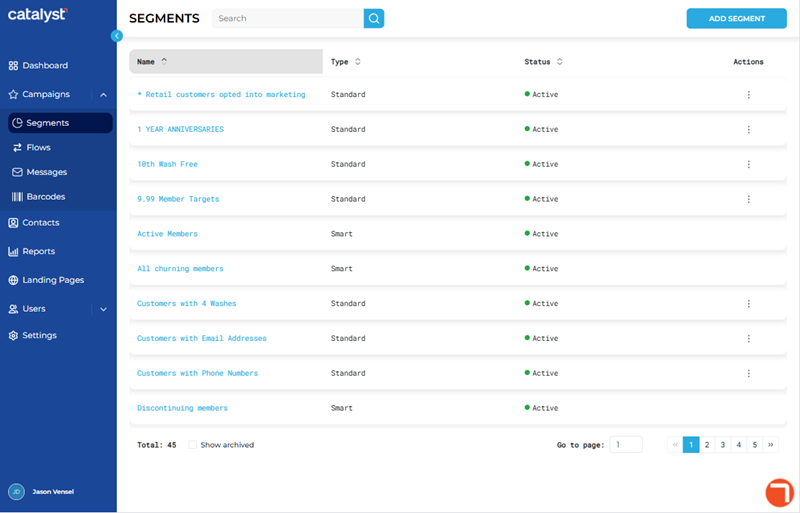
The function opens the Add Segment panel, where a new Standard segment can be created and configured.
Segments List
The segments list displays all Standard and Smart customer segments. It includes basic information for each segment, along with search and navigation functions to quickly locate a segment or segments.
Search
The search tool provides the ability to locate a specific segment by all or part of its Name. Note: Search ignores archived segments (Status is Archived) unless Show archived is selected.
- The list auto-updates as soon as one (1) character is entered in the search tool; selecting Enter or the search icon isn't necessary to trigger the system to search (although selecting either will trigger the search function slightly faster).
- Search returns matches for any part of a segment's name, for example, a search for ac would return all of the following segments: "Active Unlimited Members" and "Inactive Wash Plan Members".
- Restore the list to all messages by clearing the search input.
Name
The Name information provides the name of the segment, formatted as a link. Select a segment name to open the Segment Properties panel and view its configuration and its audience (all contacts that make up the segment).
Type
The segment type: Smart or Standard. This setting can't be configured. All segments added by a Catalyst user are automatically set to Standard (Customer).
Standard
Standard segments are created and configured by Catalyst users. They are also called Customer segments.
Smart
Smart segments are included with all Catalyst accounts. They can't be edited. There are fifteen (15) Smart segments.
Active Members
The contact is a wash plan member of a plan that has a status of Active.
The segment's Short Name is ActiveMembers.
All churning members
The contact is a wash plan member of a plan that has a status of either Expiring or Discontinuing.
The segment's Short Name is ChurningMembers.
Discontinuing
The contact is a wash plan member of a plan that has a status of Discontinuing.
The segment's Short Name is Discontinuing.
Inactive Members
The contact was a wash plan member in the past, but hasn't been a wash plan member for at least ninety (90) days.
The segment's Short Name is InactiveMembers.
Members with High Redemptions
The contact is a wash plan member who redeemed their plan five (5) or more times during the past thirty (30) days.
The segment's Short Name is HighRedemptions.
Members with Low Redemptions
The contact is a wash plan member who redeemed their plan two (2) or less times during the past thirty (30) days.
The segment's Short Name is LowRedemptions.
Multi-vehicle Members
The contact is a wash plan member of a plan that includes two (2) or more vehicles.
The segment's Short Name is MultiVehicle.
New Members
The contact is a wash plan member of a plan that has a status of Active and they purchased the wash plan during the past ninety (90) days.
The segment's Short Name is NewMembers.
Non Members
The contact has never been a wash plan member.
The segment's Short Name is NonMembers.
Non Member with Frequent Visits
The contact has never been a wash plan member, but has visited three (3) time or more during the past thirty (30) days.
The segment's Short Name is FreqNonMembers.
Non-Recurring Members
The contact is a manual renewal wash plan member of a plan that has a status of Active.
The segment's Short Name is NonRecurring.
Recently Inactive Members
The contact is a wash plan member and the plan was inactive the past ninety (90) days.
The segment's Short Name is RecentlyInactive.
Recurring Members
The contact is an auto-renewal wash plan member of a plan that has a status of Active.
The segment's Short Name is RecurringMembers.
Reloading Members
The contact is a wash plan member of a plan that has a status of Reloading.
The segment's Short Name is ReloadingMembers.
Suspended members
The contact is a wash plan member of a plan that has a status of Suspended.
The segment's Short Name is SuspendedMembers.
Status
A segment's current state. It helps control the actions that can be performed with a segment (see Actions below). There are two (2) statuses: Active and Archived.
Note: Smart segments always have a status of Active.
Active
The segment is currently in use or available for use with a campaign or flow.
Archived
The segment is not currently in use. Archived segments are not displayed in the Segments panel by default. Select Show Archived to display all Archived segments in the panel.
Note: Archived segments can't be assigned to a campaign or flow.
Actions
There are four (4) available actions. Important: Actions are only available for Standard segments. They are not available for Smart segments.
The availability of these actions for a Standard segment is dependent on the segment's status, whether it's assigned to a campaign or flow, and whether the campaign or flow is active.
|
Segment Status |
Available Actions |
|
|
Active |
Archive (*only if not assigned to campaign or flow) Duplicate Edit |
|
|
Archived |
Duplicate Edit Restore |
|
Archive
Changes a segment's Status to Archived to hide it from the list. An archived segment can be viewed with the Show archived function, as well as restored. This action is only available for segments that are not assigned to a campaign or flow.
Duplicate
Opens the Duplicate Segment panel and creates a new segment using the existing segment's settings.
Edit
Opens the segment in the Edit Segment panel. This action is only available for segments with a Status of Active, and not assigned to an active campaign, or Archived.
Restore
Changes a segment's Status from Archived to <INSERT>. This action is only available for segments with a Status of Archived.
Total
The Total value at the bottom of the panel provides the cumulative number of segments currently displayed. This value automatically updates if the search function is used or Show archived is selected.

Show archived
The Show archived function updates the segments list to include archived segments. By default, archived segments are not included in the segments list.
List Navigation
The list navigation tools at the bottom of the panel provide the ability to navigate the list of segments.
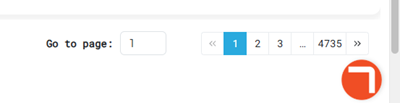
- Use the Go to page function to open a specific page by entering it in the provided field.
- Use the numeric page functions to navigate one page at a time.
- Use the last page >> and first page << functions to navigate to the end or start of the list.
Updated: 081026