KEYWORD TO OPT-IN CONVERSION (REPORTS)
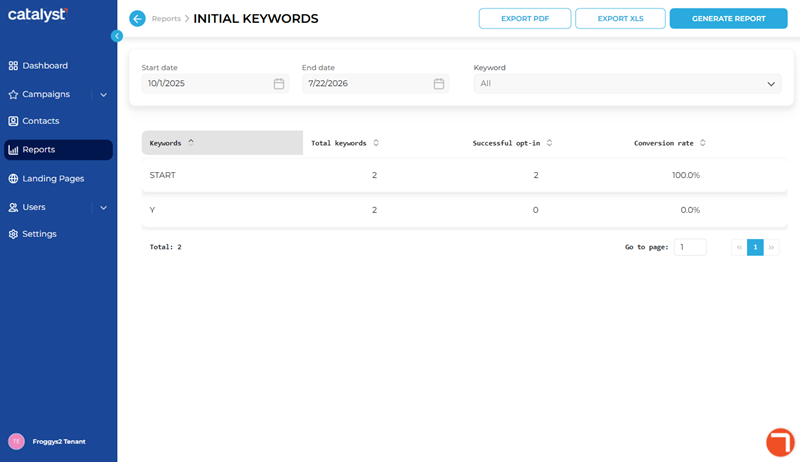
The Initial Keywords panel, accessible by selecting the Keyword to Opt-in Conversion name from the list of reports on the Reports panel, provides settings and functions to generate the Keyword to Opt-in Conversion report. This report provides information about the performance of all SMS text message opt-in keywords for a designated time period. It can be generated for only SMS text campaigns. It can be exported and downloaded to a PDF file or XLS file after it's generated.
Report Settings
The INITIAL KEYWORDS panel's report parameters include time period (user-specified up to 365 days in length) and keyword settings.
Start date | End date
The Start date and End date parameters provide the ability to generate the report for a specific date range.
Important: The maximum date range length that can be specified is 365 days.
Start date
The Start date parameter provides the first day to include in the report, in MMDDYYYY format. It can be manually entered or selected from the provided calendar.
End date
The End date parameter provides the last day to include in the report in MMDDYYYY format. It can be manually entered or selected from the provided calendar.
Keyword
The Keyword report parameter (All, or <specific keyword>) provides the ability to generate the report for all keywords or a specific keyword.
All
Generates the report for all SMS text message keywords.
<specific keyword>
Generates the report for only the specific keyword.
EXPORT PDF
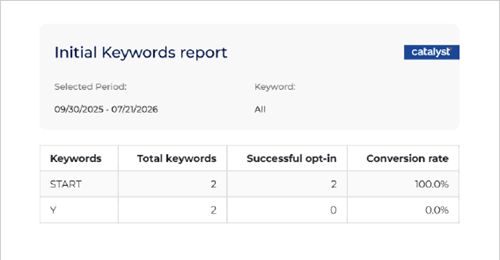
The function provides the ability to download a PDF copy of the Keyword to Opt-in Conversion report, after the report is generated. The function is disabled when the Initial Keywords panel first opens; it is enabled after the report is generated.
Filename Format
The PDF filename format is Keyword to Opt-in Conversion MM_DD_YYYY.pdf, where MM_DD_YYYY is the end date of the report.
Download Location
The PDF file is generated and automatically downloaded to the download location configured for the web browser from which the report is generated.
EXPORT XLS
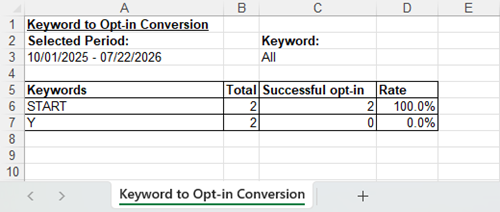
The function provides the ability to download an XLS copy of the Keyword to Opt-in Conversion report, after the report is generated. The function is disabled when the Initial Keywords panel first opens; it is enabled after the report is generated.
Filename Format
The XLS filename format is Keyword to Opt-in Conversion MM_DD_YYYY.xls, where MM_DD_YYYY is the end date of the report.
Download Location
The XLS file is generated and automatically downloaded to the download location configured for the web browser from which the report is generated.
GENERATE REPORT
The function generates the Keyword to Opt-in Conversion report for the configured parameters.
Report Data
Keywords
The Keywords column provides the keyword(s) included in the generated report.
Total keywords
The Total keywords metric provides the number of messages sent that included the corresponding keyword.
Successful opt-in
The Successful opt-in metric provides the number of recipients that opted in to receiving messages by replying with the corresponding keyword.
Conversion rate
The Conversion rate metric provides the percentage of recipients that opted in to receiving messages by replying with the corresponding keyword, out of the total number of messages sent that included the corresponding keyword.
Updated: 081026